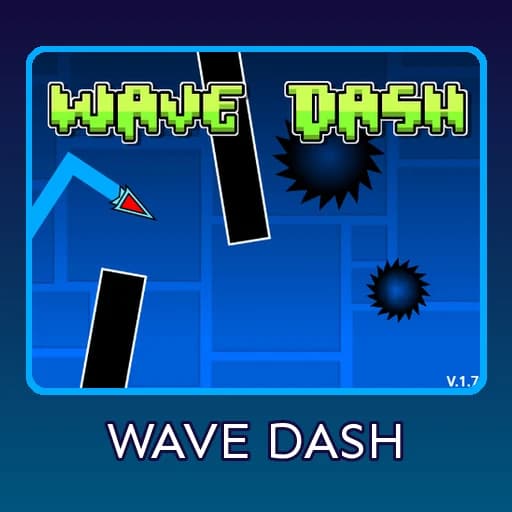
Game created by @FrankEagle1 on Scratch: Wave Dash on Scratch. The project is shared under the Creative Commons Attribution-ShareAlike 2.0 license used for all Scratch projects.
Music in the game is credited by the creator to Waterflame, DJVI, Forever Bound, dj-nate, F-777 and MDK. Community shop designs are credited inside the game.
This is an independent fan site. It is not affiliated with, endorsed by or connected to RobTop Games. The game on this page is a free, fan-made project hosted on Scratch and shown here through Scratch’s official embed player.
Wave Dash
Steer a zig-zag wave through pillars, saw blades and gravity portals in this hard Scratch skill game. Collect mana orbs and unlock skins.
How to play
The controls are deliberately minimal, which is exactly what makes the game so demanding. According to the project instructions, you can use any of these inputs:
- Space bar – hold to fly up, release to fall
- Up arrow or W – same as space
- Tap / click – hold on the screen on a phone or tablet
Press Play on the title screen, then keep your wave inside the open space. Touching a pillar, a saw blade or the edge of a gap destroys the wave immediately, a short death message appears, and you can try again. Gravity portals flip the direction of the wave, so after you pass through one, holding the input sends you down instead of up. Learning to react to that switch is one of the first real hurdles.
About Wave Dash
Wave Dash is a one-button wave game made on Scratch by @FrankEagle1. You steer a zig-zagging arrow through a scrolling corridor of black pillars, spinning saw blades and gravity portals, and a single touch ends the run. Its creator puts it bluntly in the instructions: this is a very hard game, and it might make you rage. With more than 320,000 views on Scratch, it is one of the most played wave projects on the platform, and it has grown far beyond a basic prototype.
Since its first release in November 2023, the game has received a long list of updates: a title screen, a player editor, portals, a click counter, death messages, options with language selection, scrolling backgrounds, a soundtrack selector, collectible mana orbs, a shop with skins and trails, and finally a community shop. You can play it right here in your browser on desktop or mobile, with nothing to install.
What is Wave Dash?
Wave Dash is an endless skill game built around a single mechanic: the wave. Your icon constantly moves forward while the level scrolls past. Holding the input sends it diagonally upward; letting go sends it diagonally downward. The result is a sharp zig-zag line that you have to thread through gaps between pillars and saw blades. The creator credits the wave mode of RobTop’s game as the inspiration, but the project itself is an original Scratch creation with its own engine, art, menus and progression.
Instead of a fixed level with an end, Wave Dash keeps generating obstacles, and your goal is to survive long enough to beat your score. The game tracks your current score, your personal best and the number of clicks you made, and it shows a “New Best!” message when you break your record. A cloud variable labelled World Record is also part of the project, and the creator invites players to comment when they beat it.
How to Play Wave Dash
The controls are deliberately minimal, which is exactly what makes the game so demanding. According to the project instructions, you can use any of these inputs:
- Space bar – hold to fly up, release to fall
- Up arrow or W – same as space
- Tap / click – hold on the screen on a phone or tablet
Press Play on the title screen, then keep your wave inside the open space. Touching a pillar, a saw blade or the edge of a gap destroys the wave immediately, a short death message appears, and you can try again. Gravity portals flip the direction of the wave, so after you pass through one, holding the input sends you down instead of up. Learning to react to that switch is one of the first real hurdles.
The creator describes the game as “100% mobile friendly”, so the touch controls are not an afterthought. On a computer, most players find the space bar the most precise option because it gives a clear press and release.
Features
- Gravity portals that reverse your controls in the middle of a run.
- Saw blades and moving obstacles alongside the classic pillars, including a section the creator nicknamed “Clubstep Monster”.
- Mana orbs you collect while playing and spend in the shop.
- Unlockable skins and trails, plus a player editor and a player selector to change how your wave looks.
- Community shop with designs from players, credited inside the game.
- Music chooser with tracks credited to Waterflame, DJVI, Forever Bound, dj-nate, F-777 and MDK.
- Options menu with sound settings, controls help and language selection: English, Swedish and Japanese.
- Statistics: score, best score, click counter, attempts and a “New Best!” banner.
An important detail from the notes: your best score, mana orbs and unlocked skins and trails are kept when you press the green flag to restart, but they are reset if you reload or close the tab. If you have unlocked something you like, keep the tab open.
Tips and Tricks to Win
- Use short taps, not long holds. The wave moves at a steep angle, so small corrections keep you in the middle of narrow gaps.
- Aim for the centre of each opening. Hugging the edge of a pillar leaves no room for the next obstacle.
- Watch for portals early. Once you see a gravity portal, prepare to reverse your rhythm before you hit it, not after.
- Respect the saw blades. Their round shape makes the safe space smaller than it looks; give them extra margin.
- Pick music that helps you. The music chooser lets you play with a track whose tempo suits your timing.
- Don’t reload the page. Restart with the in-game button or the green flag so you keep your orbs and skins.
- Take breaks. The creator warns the game can make you rage; a tired hand reacts late, and late reactions end runs.
Play Wave Dash Free Online, No Download
You can play Wave Dash for free right here in your browser, with no download, install or sign-up needed. The game runs in the Scratch player embedded on this page, so it works on Windows, Mac, Chromebook, Android and iPhone. Click the game area first so it receives your key presses, then press space, W, the up arrow or tap the screen to start flying.
If the game does not respond to the keyboard, click inside the player once more. If you want to see the full project, read the comments or check the code, open it on Scratch using the link in the credits below.
Frequently Asked Questions
Is Wave Dash free? Yes. It is a free fan-made Scratch project and you can play it here at no cost.
What are the controls? Space, W, the up arrow, or tap and hold on a touch screen to fly up; release to fall.
Does it work on mobile? Yes, the creator describes it as fully mobile friendly.
Why did I lose my skins? Progress is reset when you reload or close the tab. Restarting with the green flag keeps it.
Can I build my own obstacles? The creator runs a Scratch studio where players share samples for waves and obstacles; the link is on the project page.
Similar Games
If you enjoy steering a wave, try Space Waves or Wave 2. For a slower, puzzle-like platformer, play Cube Dash (Platformer), and for an auto-running cube jumper, try Marshmallow Dash.
Credits and License
Game created by @FrankEagle1 on Scratch: Wave Dash on Scratch. The project is shared under the Creative Commons Attribution-ShareAlike 2.0 license used for all Scratch projects.
Music in the game is credited by the creator to Waterflame, DJVI, Forever Bound, dj-nate, F-777 and MDK. Community shop designs are credited inside the game.
This is an independent fan site. It is not affiliated with, endorsed by or connected to RobTop Games. The game on this page is a free, fan-made project hosted on Scratch and shown here through Scratch’s official embed player.
Conclusion
Wave Dash takes one simple idea, a line that goes up when you hold and down when you let go, and turns it into a long-term challenge with portals, saw blades, a shop and dozens of cosmetics. It is easy to start and very hard to master. Play it above, chase a new best score, and see how far your reflexes can carry the wave.
Independent fan site, not affiliated with RobTop Games. About